
Search your library
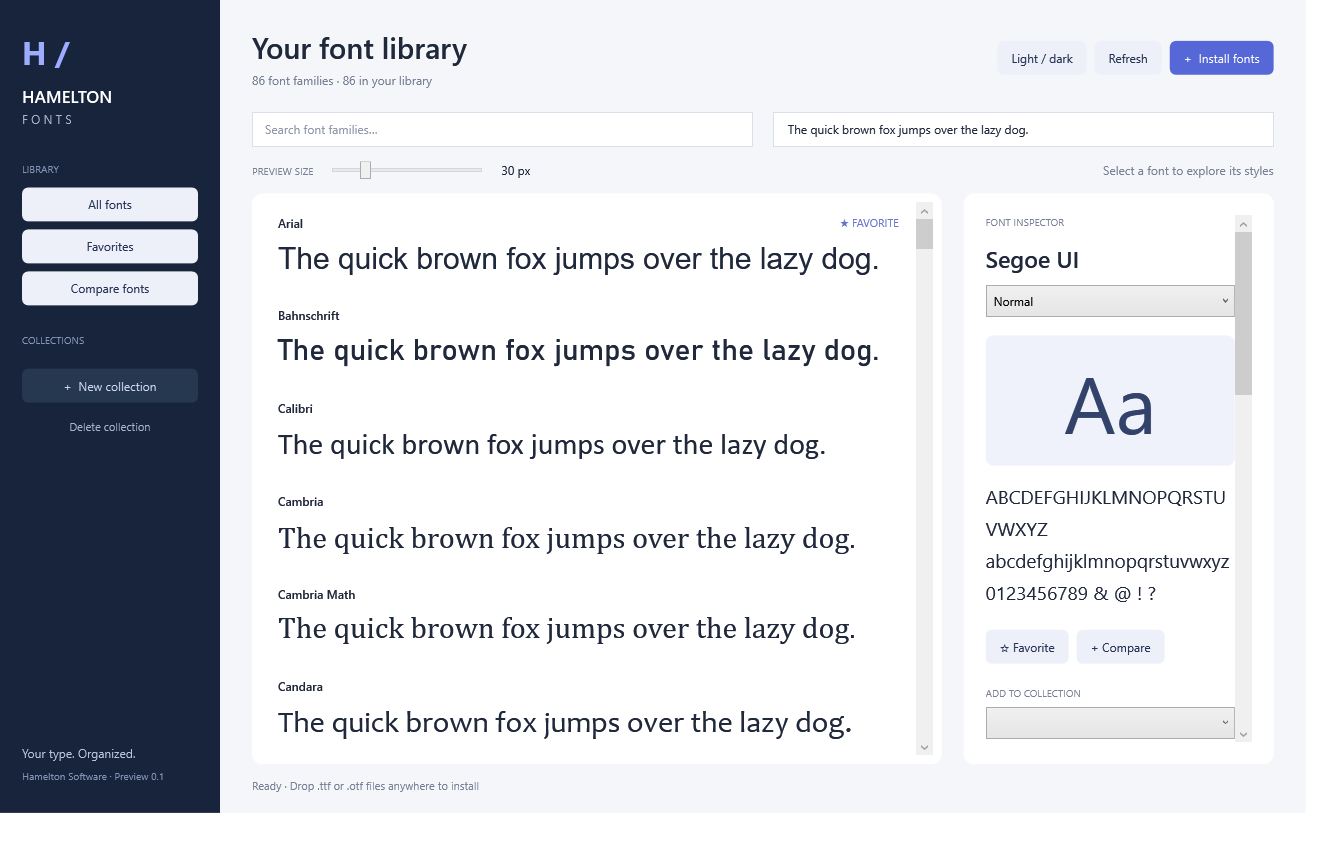
Find installed font families and preview them with your own sample text and adjustable size.

Hamelton Fonts for Windows
A clear view of your font library. Find the right family, try your own text, and bring favorites and collections together in a native Windows application.
Development preview 0.1
A closer look
Explore the fonts already on your computer, organize your choices and compare the details before you commit.
Find installed font families and preview them with your own sample text and adjustable size.
Explore styles, glyph information, symbol previews and embedded font license descriptions.
Keep frequently used families close, and organize fonts into named collections for your projects.
See candidate fonts side by side with editable sample text, without jumping between separate previews.
Add TTF and OTF files through a file picker or drag and drop. Review validated files before per-user installation.
Fonts installed through the application can be removed with confirmation and a retained file backup. Other installed fonts are protected.
Product status
Hamelton Fonts is a working development preview. A public retail release and download have not been announced.
Commercial licensing, signed installation and updates are part of future release work. Product activation and the licensing service are not available yet.
Questions
A public download has not been announced. Contact us for product questions and availability.
The current preview runs locally and stores your favorites and collections on your computer.
It manages your installed fonts and the TTF or OTF files you supply. Font metadata does not grant permission to redistribute or use a font beyond its license.
TTC collections, temporary font activation, system-wide administrator font removal and automatic updates are not included in the current scope.
From our type collection
Download our display typeface in six weights, free for personal and commercial projects.
Explore the free font